1 Your practice2 Contact3 Calendar

About your practice

Which products are you interested in? Select all that apply
What software does your firm use? Select all that apply
Select your software
Document collection to Drake effortlessly & accurately!

Import Client documents to Drake —without retyping.

Bring every client document into one organized record—from the office kiosk, website, email, or text. AI Front Desk and CRM use prior returns and conversations to identify what is missing and follow up through the channels your firm chooses.

TaxAutomate automates Drake Tax data entry from client documents by building a bookmarked PDF binder and, after your preparer approves the source values, entering supported data in the real Drake screens. Your preparer verifies the entry and finishes the return.

You control the follow-up. Your preparer controls approval, final review, and filing.

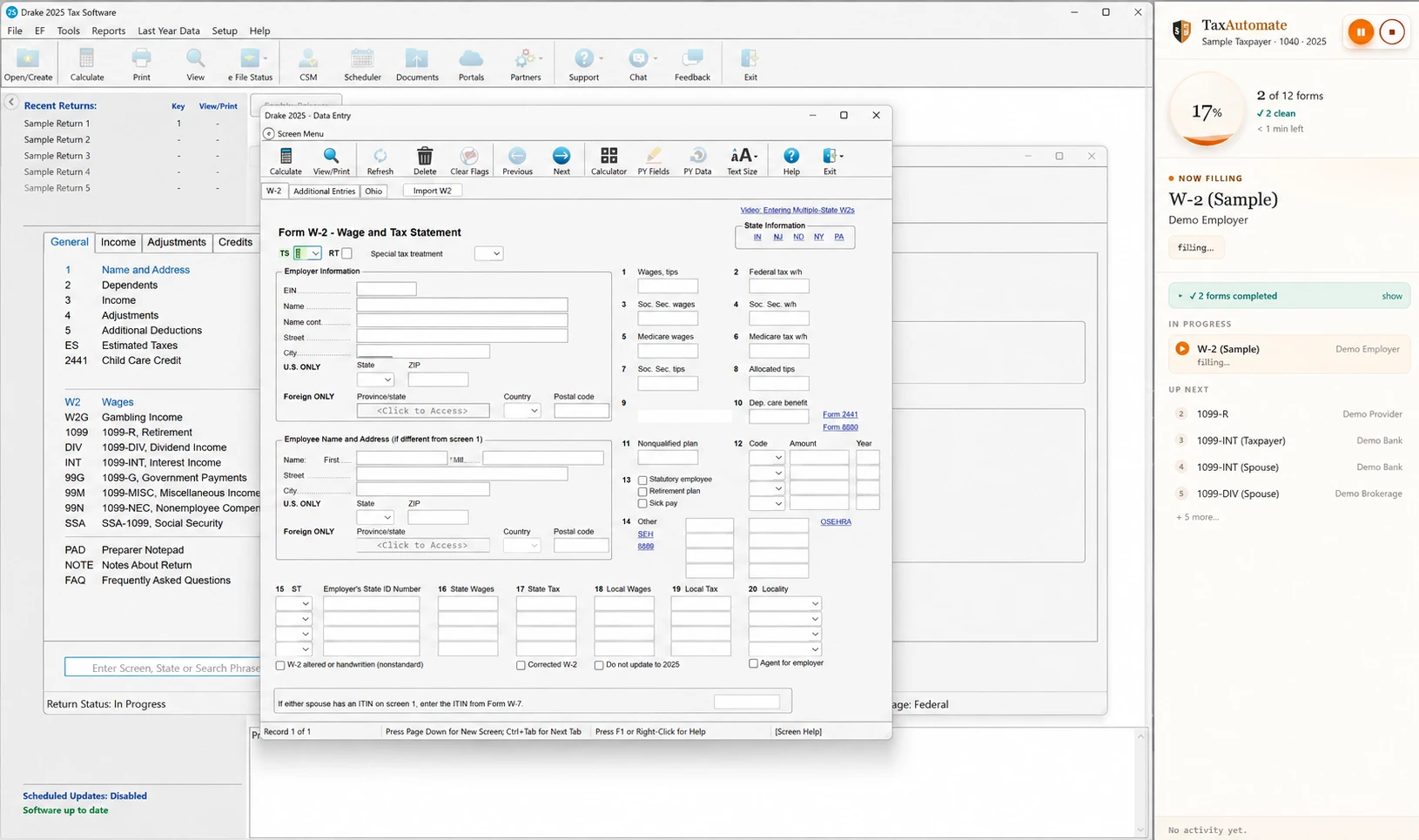
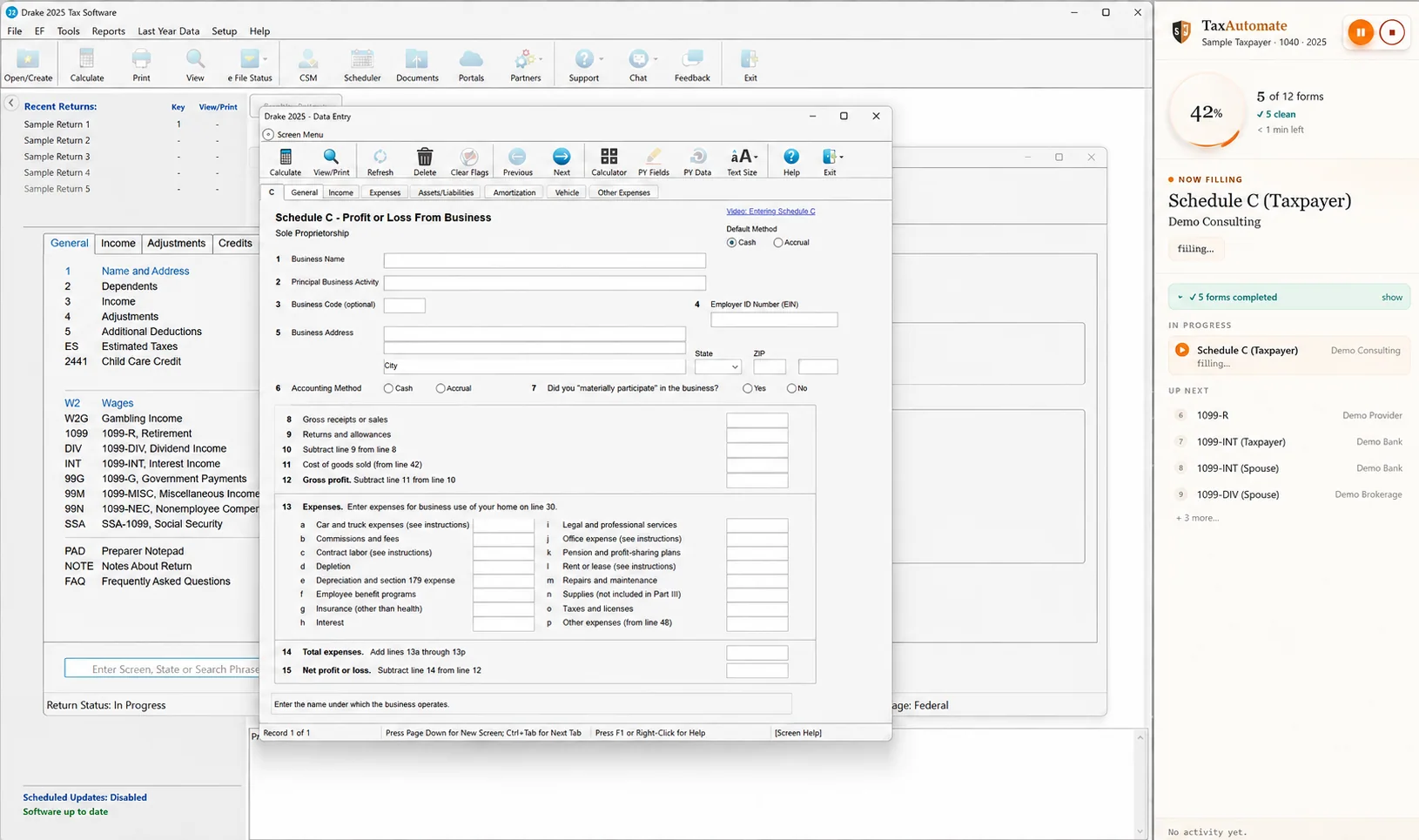
Sanitized Drake W-2 preparation screen with TaxAutomate progress panel
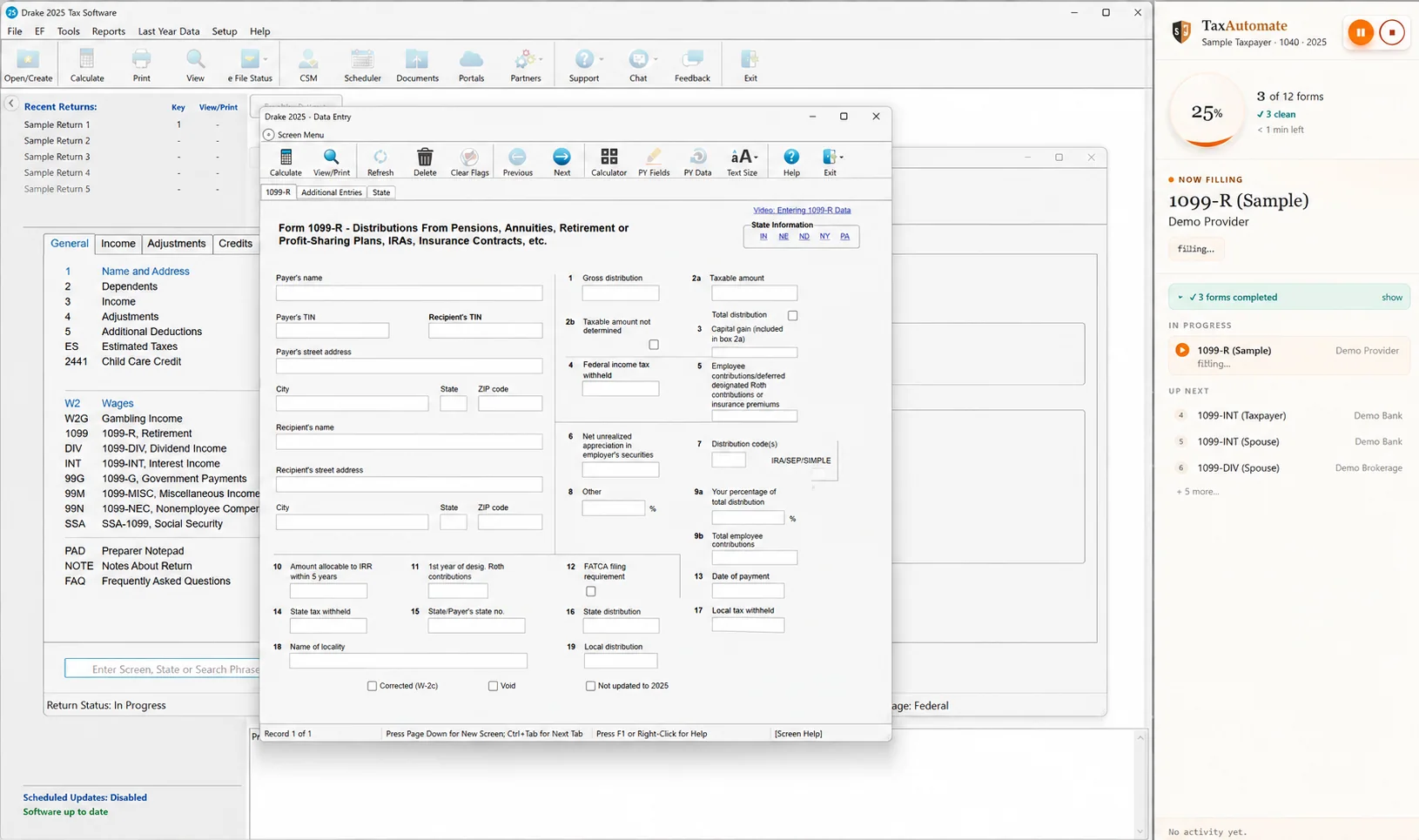
Sanitized Drake 1099-R preparation screen with TaxAutomate progress panel
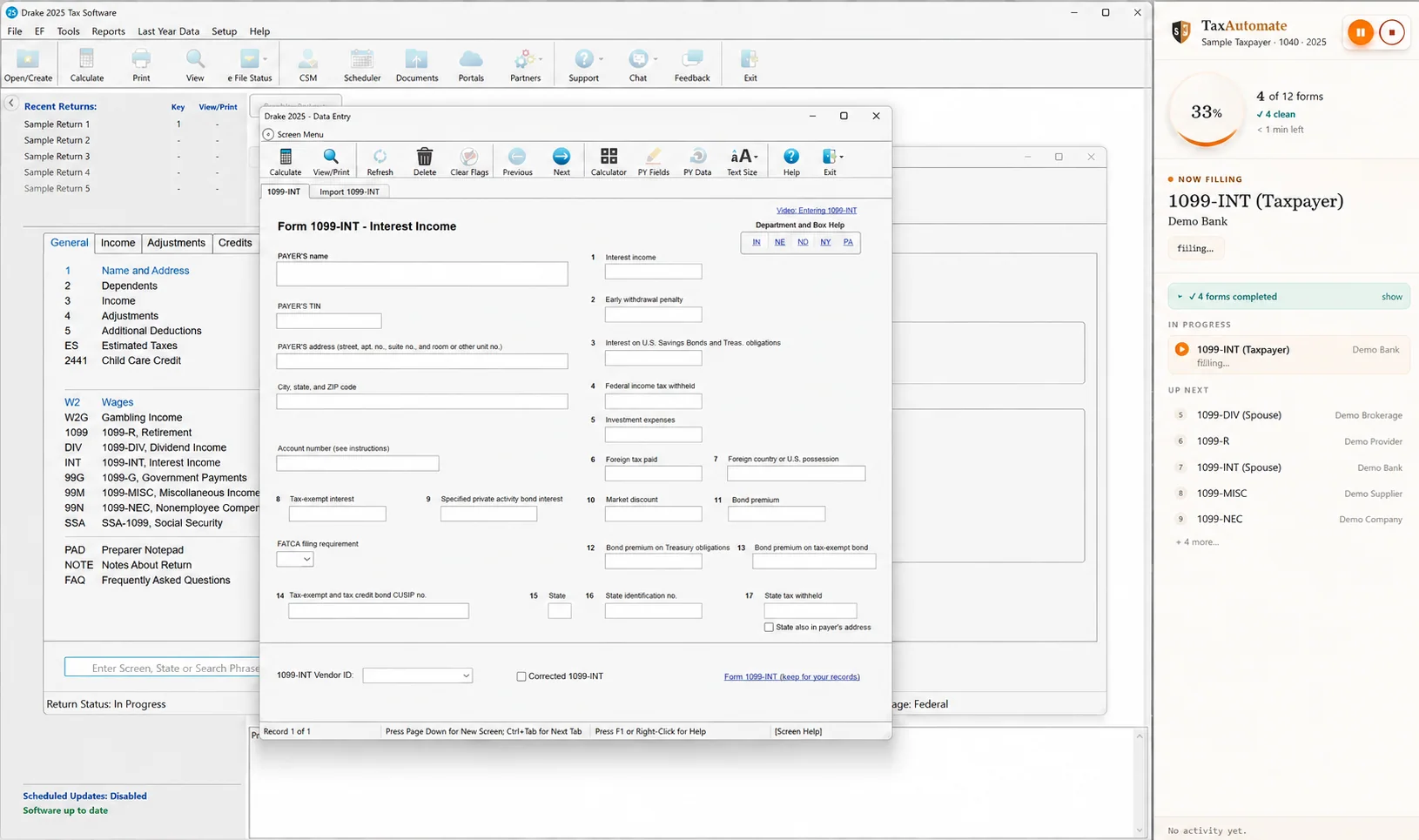
Sanitized Drake 1099-INT preparation screen with TaxAutomate progress panel
Sanitized Drake Schedule C preparation screen with TaxAutomate progress panel
Approved
in binder
Entered
in Drake
Approved source → Drake entry → preparer review.Private walkthrough available after booking.
Private video walkthroughWatch TaxAutomate enter data in DrakePrivate 1040 and partnership walkthroughs.Book a demo to unlock →

Five connected steps to automated Drake Tax data entry.

Start by gathering every client document into one complete file. TaxAutomate helps collect what is missing, builds the workpaper binder, routes values for approval, and performs the supported Drake entry. Your preparer verifies the entry and finishes the return.

1

Gather every client document in one place.

Start with one complete client file. Documents can arrive through your office kiosk, website, email, phone, or text, and every reply and upload stays with the same client record. TaxAutomate’s AI Front Desk and CRM help your team get there: they compare what has arrived with the prior-year return, open requests, and past conversations to identify what is still missing. The AI can follow up automatically, but your team chooses the pace, timing, and channels—and can pause, change, or take over any conversation.

The goal is one complete client file. AI helps your team get there.

TaxAutomate bringing client documents and conversations from every approved channel into one client record
Every channel → one client recordAI helps identify and request what is missing
2

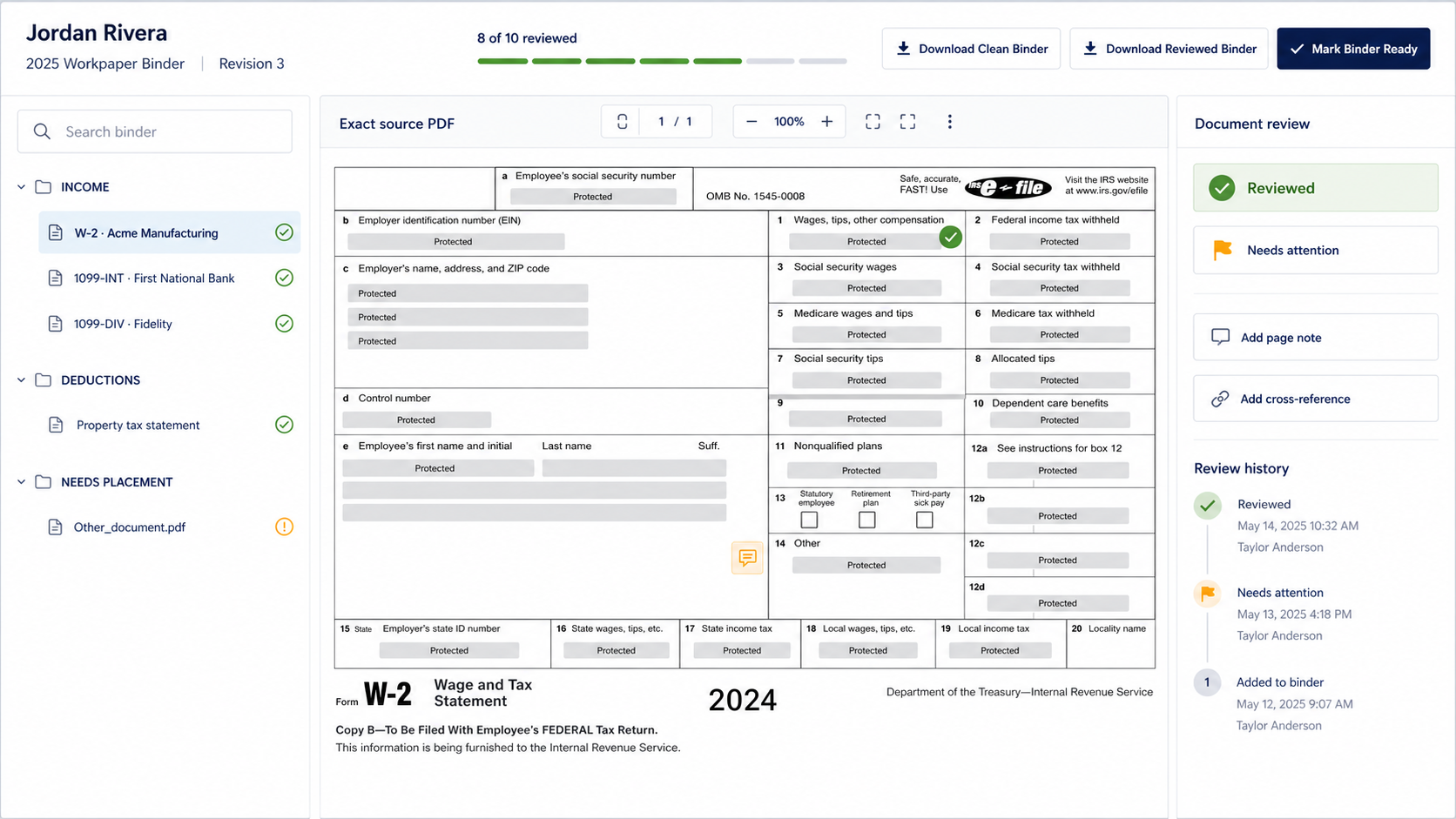
TaxAutomate turns the document mess into an indexed PDF workpaper.

As files arrive, the software identifies and organizes the source documents, groups related pages, and builds one labeled, bookmarked PDF binder. Prior-year context and open requests remain attached to the same client record. Your team can rename, reorder, or regroup documents before marking the binder ready for review.

The software organizes it. Your team controls the final binder.
Bookmarked TaxAutomate workpaper binder showing a full W-2 PDF page
Documents identified and groupedBookmarks make every source easy to find
3

Self-check every value against the original PDF.

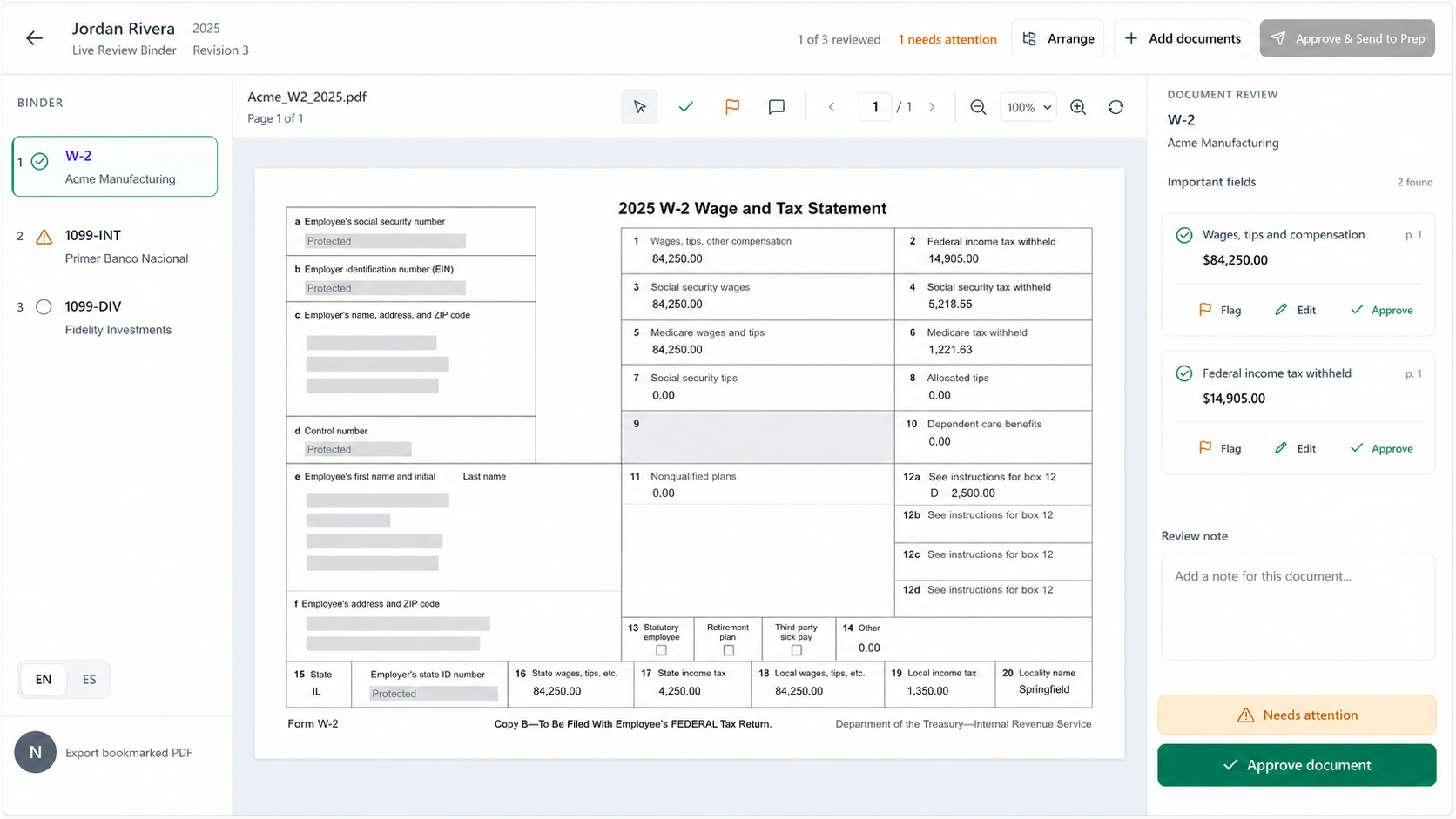
The split-screen review keeps the source document beside the extracted fields. Select a value and TaxAutomate brings its exact source area into focus. Your preparer can correct an OCR read, change a document classification, regroup pages, approve the value, or flag it.

Every approved value stays linked to its source.
TaxAutomate split-screen PDF review with extracted fields and source-area highlighting
Select a field → focus its sourceCorrect, regroup, approve, or flag
4

TaxAutomate enters approved data in Drake Tax.

Your preparer does not retype the approved values. After approval, TaxAutomate opens the correct Drake screens on the paired Windows workstation and automatically enters each supported value into the matching field.

The software performs the supported data entry—not your staff.
Bookmarked PDF Binder Approved source
Approved source page in the bookmarked PDF binder
Drake 2025 Entered value
Sanitized Drake screen after TaxAutomate data entry
Side by
side
Your preparer compares the approved PDF with the Drake field
Preparer verifies
5After Drake data entry

Your preparer verifies the entry and finishes the return.

After TaxAutomate performs the supported data entry, the approved binder value and entered Drake value are presented side by side for your preparer. Your preparer confirms correct entries, resolves anything missing or different, reviews Drake’s calculations and diagnostics, handles unsupported items, applies professional tax judgment, completes the final review, and controls filing.

✓

Your preparer confirms the entry

Compare the approved source with the entered Drake field and confirm that it is correct.

×

Your preparer resolves discrepancies

Correct missing or different values and resolve Drake diagnostics or unsupported items.

Your professional finishes the return

Make the final tax decisions, approve the completed return, and control filing.

Automation with firm control

TaxAutomate does the work. Your professionals make the decisions.

TaxAutomate brings each client’s documents into one record. AI Front Desk and CRM help identify and request what is missing, and the software organizes the file and performs supported data entry within the rules your firm sets. Your preparer verifies the Drake entry, resolves exceptions, reviews diagnostics, applies tax judgment, completes final review, and controls filing.

1
You control the AI’s pace and channels.Choose when it follows up, where it communicates, and when a staff member takes over.
2
You control every approval and exception.Correct, regroup, approve, reject, or stop work before data enters Drake.
3
You control verification, final review, and filing.Your preparer verifies the entry and your authorized professional controls the completed return.
Where the automation runs

TaxAutomate operates the real Drake software for you.

Your firm pairs the Windows workstation that runs Drake with TaxAutomate. The software—not your preparer—opens the correct Drake screens and enters each supported approved value. The approved source and entered value are then presented for your preparer to verify. This is desktop automation through the Drake interface, not a direct Drake API.

Clear responsibilities

How Drake Tax data entry automation works—and what your team controls.

TaxAutomate performs the repetitive work. Your firm sets the rules and retains every professional decision.

How are client documents gathered into one place?

Documents received through your office kiosk, website, email, phone, or text stay with one client record. AI Front Desk and CRM then help your team identify and request what is still missing.

How does the AI know which documents are missing?

AI Front Desk and CRM use the client record, prior return, documents already received, open requests, and conversation history to maintain a client-specific checklist. The checklist updates as replies and uploads arrive.

Can our team control the follow-up?

Yes. Your team chooses the cadence, timing, and allowed channels, including office kiosk, website, email, phone, and text. Staff can pause, change, or take over a conversation at any time.

Do extracted numbers go straight into Drake?

No. TaxAutomate organizes and extracts the information, but your preparer reviews the source and approves the supported values first.

Who performs the Drake data entry?

TaxAutomate does. After approval, the software opens the real Drake screens on the paired Windows workstation and automatically enters supported values into the matching fields. Your staff does not retype them.

Who verifies the Drake entry?

Your preparer does. The approved source and entered Drake value are presented side by side so your preparer can confirm the entry or resolve anything missing or different.

Does TaxAutomate connect through a Drake API?

No. The paired Windows connector operates through the real Drake desktop interface. It is desktop automation, not a direct Drake API.

What if someone changes a source document?

TaxAutomate detects that the binder revision changed. The old run cannot move forward; the current documents must be reviewed and approved again.

Does it work with every Drake field?

No. W-2 support is strongest today, along with selected 1099 fields. TaxAutomate only enters supported mapped fields, and your preparer handles everything else.

Who makes the final tax decisions and files?

Your authorized tax professional does. TaxAutomate performs supported automation, but it does not verify the Drake entry, exercise tax judgment, complete final review, or file the return for your firm.

How can my team watch the full automation?

Book a demo to receive access to the private 1040 and partnership walkthroughs. Your team can use an authorized, secure, expiring viewing link.

See the unified workflow

Book a demo to watch TaxAutomate do the work.

See client documents come together in one record, watch the AI help identify and request what is missing within your rules, review the bookmarked binder, and see TaxAutomate perform the supported Drake data entry before your preparer verifies and completes the return.

Gather every client document in one recordReview the bookmarked PDF binderWatch TaxAutomate perform the Drake entrySee the preparer verification stepKeep final review and filing with your firm
Watch TaxAutomate perform the Drake data entryPrivate and gated. After booking, your team receives a secure, expiring viewing link for the 1040 and partnership walkthroughs.